Getting Started with MeowFactory
From Steam install to a stable first production line without melting the cats.
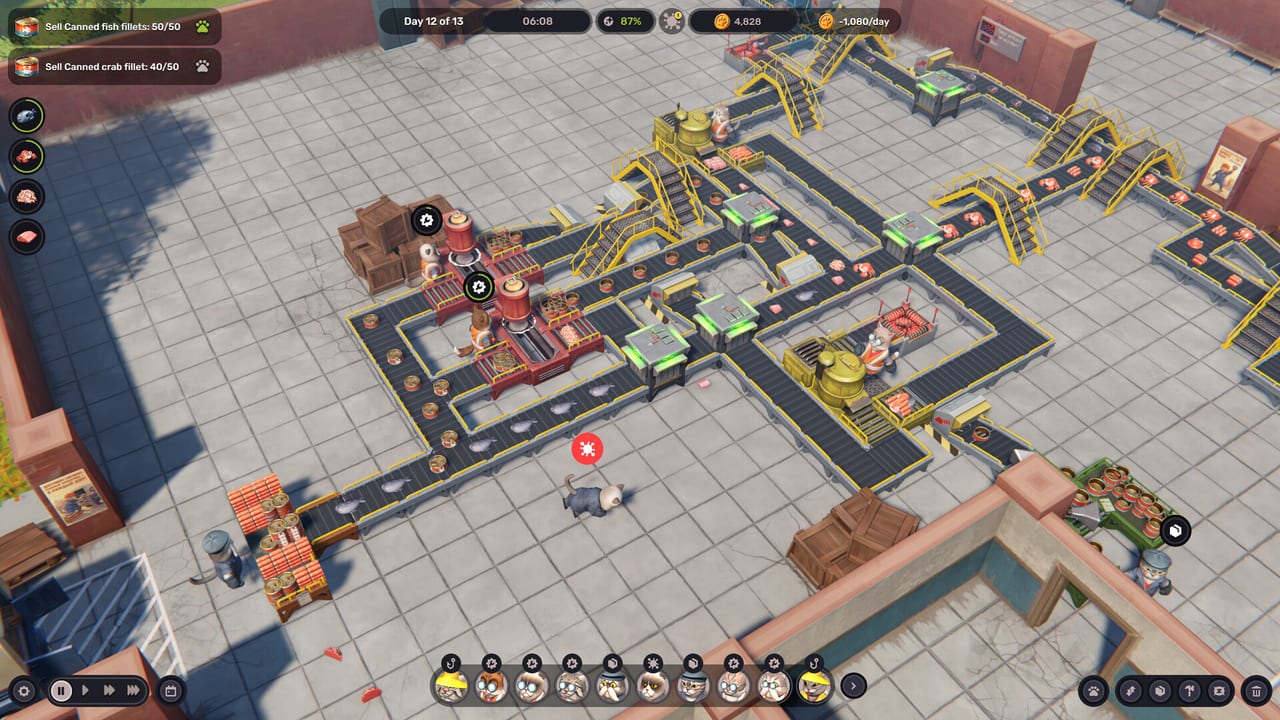
MeowFactory drops you into a near-future food plant where the only reliable labour force left is cats — the meoworkers. Humans got lazy after disaster and AI governance; your job at Meow-X is to rebuild production with limited floor tiles, quirky staff, and relentless order tickets. This getting-started guide covers what to do in the first hour: install cleanly, finish the tutorial with good habits, place a simple line, and avoid the early failures that make players quit before the joke lands.
The game is a single-player simulation/strategy title from Smola Game Studio, published with Gamirror Games, launching on Steam November 27, 2026 for Windows and macOS. A free demo (Steam app 4731370) already includes a rebuilt tutorial and the first campaign chapter. Confirm your PC against the system requirements before a long session, then bookmark the Guides Hub for the rest of the wiki.
What kind of game this is
Think puzzle-factory, not infinite sandbox on day one. Campaign levels present constrained rooms: you must place machines, connect conveyors, and meet sell targets while cats behave like cats. Automation exists so you minimize paw labour — manual carrying and fiddly hand-offs. The more you rely on paws, the slower you ship and the more chances a meoworker has to snack, nap, fight, or ride a belt into a machine intake.
Compared with pure belt games, MeowFactory adds a colony-sim layer: mood, cleanliness, pay, and sleep. Compared with pure management sims, the geometry of belts and machines is the real boss. You win by designing calm systems, not by micromanaging every whisker forever.
Before you click Play
- Install the demo or wishlist the full game on Steam (full app 4088520). Demo progress is for learning; do not assume every unlock carries 1:1 into every full-release mode.
- Check specs. Minimum Windows builds ask for roughly an i5-class CPU, 8 GB RAM, and a GTX 1060-class GPU; macOS wants Apple Silicon on recent OS versions. Details live on the system requirements page.
- Join the signal, ignore the noise. Official Discord and store links are collected on the Links Hub. Patch notes and demo changelogs appear on the Updates Hub.
- Expect English UI with broad localization on Steam; this wiki’s English pages are the source for FR/DE/ES translations.
First-hour checklist
Use this sequence on a fresh save:
- Complete the tutorial without rushing the build menu tooltips. Note how blueprints place, how R rotates pieces, and how right-click cancels queued ghosts.
- Open the construction list and identify source machines, processors/packers, storage, and conveyors. Early demos often teach fishing → packing → sell with storage as a buffer.
- Build the shortest complete chain that fulfills the on-screen order. Do not decorate. Throughput first.
- Assign meoworkers to clear professions when prompted. After the August demo update, cats remember their profession and return after emergencies or idle spells — use that; stop reassigning panic-style.
- Place at least one sleep / rest option as soon as the level allows. Tired cats invent hobbies: belt surfing, box diving, interpersonal violence.
- Watch the line for thirty seconds at normal speed. If product piles up, add storage or a splitter. If cats vanish into machines, pull them out and add bridges or barriers where the game offers them.
- Only then raise simulation speed. Speed amplifies bad layouts.
Core controls and UI habits
Exact keybinds can vary by patch, but demo footage and tutorials consistently teach:
- Select and place blueprints from the build menu; left-click confirms segments.
- Rotate with R before locking a machine or belt turn.
- Remove / cancel with right-click on queued blueprints.
- Machine mirroring (demo update) lets you flip buildings to hug walls and shorten belts — use it whenever a mirror saves two tiles of conveyor.
- Cat selection panel (redesigned in demo updates) is how you inspect mood and job; glance at it whenever throughput dips for “no obvious reason.”
Treat the bottom panel like a radar: if three cats show misery icons while belts look fine, your problem is care, not geometry. Jump to Meoworker Care once you can place a line without thinking.
Your first production loop
A healthy beginner loop looks like this:
- Input station creates or gathers the raw good (often fish in early content).
- Conveyor moves items without paw carries.
- Packing / processing upgrades the good into the SKU the order wants (for example fish boxes).
- Storage absorbs bursts so one slow packer does not stall the whole room.
- Output / sell path completes the order counter.
Keep belts short. Long scenic routes look cool in screenshots and terrible when a cat boards mid-belt and rides into a hazard. Prefer compact U-shapes or wall-hugging runs. When two products must diverge, learn smart splitters early — green open, red closed in demo explanations — instead of building a second entire wing you cannot afford.
Deeper belt theory, bridges, and mirroring patterns live in Automation Basics. Come back here if you only needed the starter shape.
Meoworkers in the first hour
You do not need the full care guide yet, but you do need three rules:
- Feed the needs meter before it screams. Mood, cleanliness, and pay are not flavour text; neglected cats escalate into fights, fires, floods of mud, or “cat hell” factory states the store page warns about.
- Pull riders and nose-stickers immediately. Manual rescue is part of play. Automation reduces frequency; it does not delete curiosity.
- Give them somewhere to sleep. Developer tips in-game call out sadness when cats lack sleep space. A tidy line with exhausted staff still fails quotas.
When accidents spike, slow the sim, fix care, then rebuild the offending belt corner. Ranking which setups feel strongest later belongs on the Tier List Hub; early on, “stable and short” beats “clever and fragile.”
Campaign framing for beginners
The full game targets roughly 18 puzzle levels across 5 chapters, plus free mode and survival mode. The demo focuses on the tutorial and Chapter 1 (about four campaign levels after tutorial, depending on build). Treat Chapter 1 as a skills exam:
- Can you finish a chain without paw bottlenecks?
- Can you add a second SKU without knotting belts?
- Can you survive a mood dip without a total rebuild?
A structured clear of those levels is in the Demo Walkthrough. Use that page when you want level-by-level goals rather than philosophy.
Common beginner mistakes
- Spamming belts everywhere. Empty floor is a resource. Leave room for sleep, storage, and a future packer.
- Ignoring profession memory. Rehiring the same cat into a new job every panic wastes time; let them return after you clear the emergency.
- Max speed from minute one. You will miss the first belt rider and learn via explosion.
- Building for aesthetics before orders. Meet the sell count, then pretty it up in free mode later.
- Skipping care UI. A jammed belt is obvious; a quiet mood collapse is not.
- Assuming multiplayer. Friends can watch; they cannot join the shift.
What to read next
- Automation Basics — splitters, rotation, mirroring, bridges, space planning.
- Meoworker Care — mood, cleanliness, pay, disasters, team roles.
- Demo Walkthrough — tutorial and Chapter 1 route.
- Guides Hub — full index.
- Updates Hub — demo patches (conveyor rotation, profession memory, UI refreshes).
- Tier List Hub — when you start comparing layouts.
- Links Hub — Steam, Discord (
https://discord.gg/VgEhHNXEv7), socials.
Finish one clean tutorial run with a short automated chain and at least one intentional sleep placement. That single habit set carries further than any spoiler list for later chapters.
Frequently Asked Questions
Quick answers to the most common MeowFactory questions.
Is MeowFactory out yet?
The full game is scheduled for November 27, 2026 on Steam. A free demo with tutorial and early campaign levels is already available. This wiki treats the game as upcoming and will update after launch patches.
Do I need a powerful PC?
MeowFactory targets modest mid-range hardware: plan for about 8 GB RAM and a GTX 1060-class GPU on Windows, or Apple Silicon on recent macOS. Always verify the live Steam specs on the system requirements page.
Should I play the tutorial or skip it?
Play it. Placement, rotation, mirroring, and cat assignment are taught there, and the demo’s tutorial was rebuilt specifically to onboard new managers cleanly.
What should I unlock or learn first?
Prioritize a complete short production chain, conveyor comfort (rotate, delete, split), and basic meoworker needs. Fancy layouts can wait until orders are stable.
Is there multiplayer?
No. MeowFactory is single-player only. Factory puzzles, free mode, and survival are solo experiences.