MeowFactory Machines & Layout Priority
A practical automation order drawn from the demo, trailer, and public factory loop.
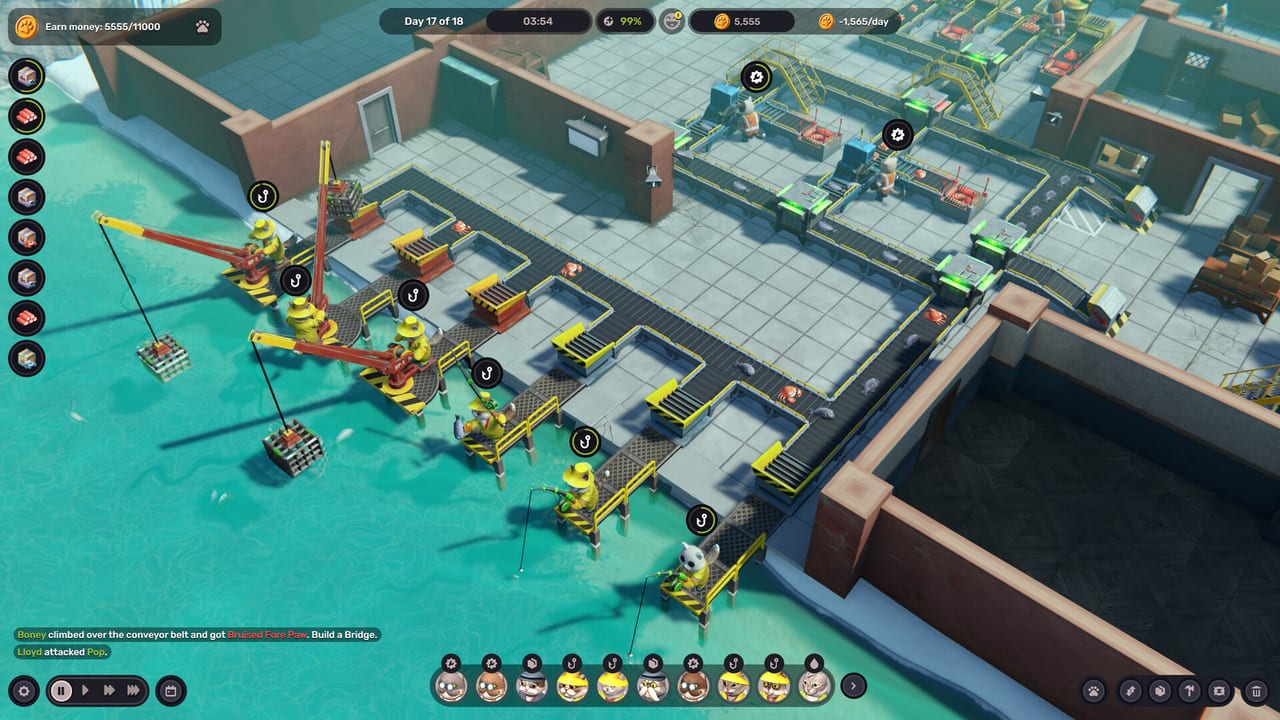
This page ranks what to prioritize when you open a MeowFactory floor: fishing and other raw inputs, processing, packing or boxing, conveyors, builder stations, and welfare gear such as beds and cleaning. It belongs under the Production Priority Hub and pairs with Getting Started.
Honesty first: MeowFactory is still upcoming (Steam release November 27, 2026). Exact station names, costs, and unlocks may differ in the full campaign. What follows is strategy guidance from the free demo, announcement trailer, and Steam feature blurbs— not a leaked spreadsheet. Use it to build habits; adjust when your save shows different bottlenecks.
The priority ladder (early → mid)
| Rank | Focus | Why it comes first |
|---|---|---|
| 1 | Fishing / raw input | Empty belts cannot fill orders |
| 2 | Processing | Turns raw goods into usable intermediates |
| 3 | Packing / boxing | Completes SKUs customers actually accept |
| 4 | Conveyors | Cuts paw trips and chaotic handoffs |
| 5 | Builder stations | Expands capacity once the cycle already works |
| 6 | Welfare (beds, cleaning) | Protects the line when cats misbehave |
Think of ranks 1–3 as the product cycle, 4 as the transport layer, 5 as scale, and 6 as stability. Skipping ahead to builders or decoration before input and packing are stable is the most common demo failure mode.
1. Fishing and raw input — S priority early
MeowFactory’s fantasy is a complete production cycle feeding lazy humans after the world went sideways. Without a reliable raw intake— fishing stations or equivalent resource nodes— every other machine is theatre. On a new level:
- Place input where cats and conveyors can reach it without crossing the entire map.
- Prefer one solid intake over three starved ones fighting for workers.
- Confirm goods actually leave the station before you invest in fancy processing.
If orders stall, audit input first. Mid-game, you may run parallel intakes for variety, but early levels reward a single clean spine.
2. Processing — high priority once goods flow
Processing machines convert raw catches or materials into intermediates. Build them downstream of input with short, readable paths. Demo and trailer footage stresses connecting machines so cats do less hammer-and-paw labour— processing is where that automation starts to feel real.
Tips:
- Face machines so outputs point toward the next step (mirroring, added in the August 2026 demo update, helps you flip layouts without rebuilding from scratch).
- Do not double processing until the first unit stays busy.
- Watch for cats snacking on intermediates; shorter open belts reduce theft and chaos.
3. Packing and boxing — close the sale
Orders care about finished goods, not pretty half-cycles. Packing or boxing stations turn processed items into shippable products. Prioritize them as soon as intermediates queue, not as an afterthought at the edge of the map.
A good packing setup:
- Sits near the end of the conveyor spine.
- Leaves a small buffer so a late cat does not jam the whole chain.
- Matches the SKUs on the current order board instead of every product you might unlock later.
4. Conveyors — mid priority, high leverage
Conveyors are how you minimize paw labour. The August demo update explicitly added conveyor rotation and machine mirroring, which signals how important facing and belt geometry are to the designers. Treat belts as a mid-priority upgrade: after the cycle exists, before you spam extra builders.
Layout habits that pay off:
- Prefer simple loops and straight runs over spaghetti that cats can ride into danger.
- Keep emergency pull-off space— official copy warns that fluffy workers stick noses into machines and treat belts like rides.
- Revisit rotation tools whenever a rebuild would otherwise cost half the level timer.
5. Builder stations — scale after the loop works
Builder capacity lets you place more machines. It is tempting to rush builders, but empty floors filled with unfed stations waste space and meoworkers. Unlock or staff builders when:
- The current cycle already completes orders with headroom.
- You need a second parallel line for variety, not because the first line is broken.
- Chapter progression (demo now surfaces chapter 1 of a planned five-chapter, ~18-level campaign) introduces denser recipes that truly need more machines.
6. Welfare — beds, cleaning, mood
Cats have needs. Trailers and store text call out mood, cleanliness, pay satisfaction, and the risk that unhappy meoworkers blow up, drown in mud, burn things, or turn your plant into a cat paradise. Beds and cleaning gear look “soft,” but they are throughput insurance.
Priority rule of thumb:
- Early tutorial floors: light welfare is enough if you supervise constantly.
- Mid levels and longer free-mode sessions: place beds and cleaning before your third redundant processor.
- After emergencies, trust job memory (demo update): cats return to assigned roles— reassign less, stabilize more.
Welfare is rarely your first build, but it should never be your forgotten build.
Early vs mid checklist
Early (tutorial / first chapter): Input → light processing → packing → basic conveyors → minimal welfare. Keep footprints tight; practice pulling cats off belts.
Mid (deeper chapter 1 / free mode experiments): Parallel input if SKUs demand it, fuller conveyor networks with rotation, mirrored machine banks, dedicated builder time, and proactive beds/cleaning so mood spikes do not erase a good layout.
Later (full release chapters, survival): Expect denser chains. Re-rank locally— survival pressure may push welfare and redundancy higher than a campaign puzzle that only needs one perfect spine.
How to use this ranking with the rest of the wiki
- Practice the ladder in the Steam demo before launch.
- Track schedule and platforms on Release Date.
- Confirm your PC or Mac against System Requirements.
- Return to the Production Priority Hub when new machines appear in patches listed on the Updates Hub.
Common mistakes to avoid
- Building a showcase factory that cannot finish a single order.
- Ignoring cat behaviour until a cute disaster deletes your buffer stock.
- Treating conveyors as decoration instead of the main labour-saving tool.
- Copying a YouTube mega-base into a tiny campaign footprint.
- Assuming demo balance equals day-one full release balance.
Master the ladder above, then bend it. MeowFactory rewards clever limited-space planning more than raw station spam— and your meoworkers will punish layouts that forget they are still cats.
Frequently Asked Questions
Quick answers to the most common MeowFactory questions.
Is this ranking official balance data?
No. It is strategy guidance based on the demo, trailer, and public Steam materials. Treat it as a decision order until post-launch patch notes refine machine values.
Why put welfare last on the ladder?
Because an empty line cannot ship orders. Welfare rises quickly in priority once cats start disrupting belts; it is last on the starter ladder, not optional forever.
Did the demo change layout tools?
Yes. The August 2026 demo update added conveyor rotation, machine mirroring, cat job memory, and chapter-style level select for chapter 1.
Where do I practice this before launch?
Play the free MeowFactory demo on Steam, then revisit this page and Getting Started after you clear the tutorial and early levels.
Will survival mode change priorities?
Likely. Survival pressure can elevate redundancy and welfare earlier. Re-score the ladder for long sessions once that mode is available in the full release.