MeowFactory Controls & UI Habits
Placement, rotation, mirroring, cat panel, and sim speed— practice over memorizing one patch’s binds.
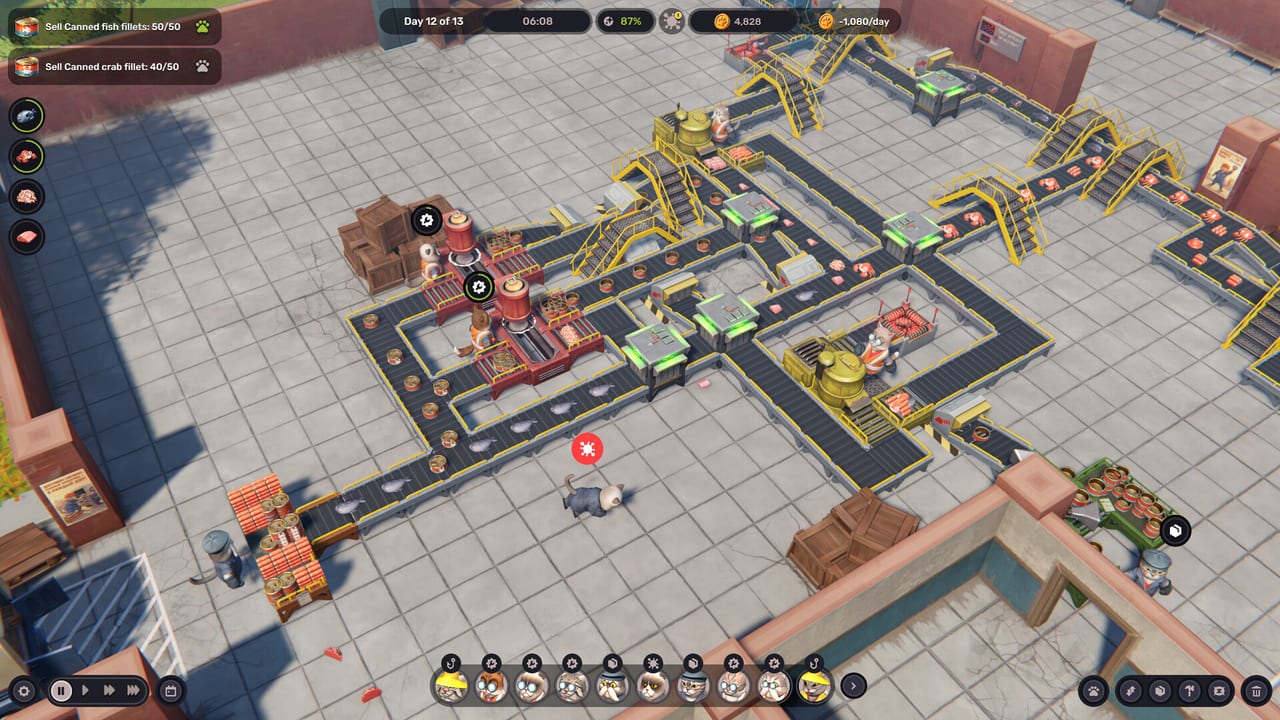
This page collects controls and UI habits for MeowFactory managers: placing blueprints, rotating with R, cancelling ghosts, using machine mirroring, reading the cat panel, and choosing simulation speed. It belongs under the Tools Hub and pairs with the narrative first-hour flow in Getting Started and the geometry deep dive in Automation Basics.
Important caveat: Exact keybinds and menu labels can vary by patch. Demo footage, tutorials, and August 2026 update notes are the basis for the habits below. When a patch remaps keys, trust the in-game prompt over any wiki cheatsheet— including this one— then come back for the habits, which transfer even if the letter on the keyboard changes.
MeowFactory is a single-player Steam title from Smola Game Studio (with Gamirror Games), launching November 27, 2026 on Windows and macOS. Practice these habits in the free demo before denser campaign rooms punish slow rebuilds.
Placement loop (the core skill)
Almost every early failure is a placement problem wearing a cat costume. Build this loop into muscle memory:
- Open the build / construction menu and identify the station or conveyor piece you need.
- Move the ghost so outputs point toward the next step in the cycle— not into a wall you will regret.
- Rotate before you confirm (commonly R in demo tutorials).
- Left-click (or the confirm bind shown on-screen) to lock segments.
- Right-click (or the cancel bind) to clear a bad ghost instead of committing a spaghetti turn.
- Watch the line for ten seconds at normal speed before you chain the next machine.
If you skip step 3, you will delete twice as many belts. If you skip step 6, you will discover the mistake at max speed with three cats already riding the error.
Rotate with R — face the cycle, not the camera
Tutorial tips consistently teach R to rotate machines and conveyor pieces before locking. Habits that matter more than the letter:
- Rotate until the output arrow (or belt flow) aims at the next station.
- Prefer wall-hugging faces that shorten runs over cinematic diagonals.
- Re-rotate after you place a neighbour that blocks the old path— do not accept a detour “for now” in a tiny campaign room.
The August 2026 demo update also emphasized conveyor rotation as a first-class QoL tool. Treat belts as editable geometry, not permanent paint.
Cancel early, rebuild cheap
Queued ghosts and misclicks are normal. Cancelling (often right-click on queued blueprints in demo teaching) is cheaper than:
- Living with a belt that invites riders into an intake.
- Spending a builder’s time deleting after the fact.
- Letting a wrong-facing packer define your entire spine.
Make cancel part of the placement loop, not an emergency-only button.
Machine mirroring — flip instead of restarting
Machine mirroring arrived in the August 2026 demo update so you can flip buildings to hug walls and shorten conveyors without rebuilding from scratch. Use it when:
- A mirrored packer saves two tiles of belt.
- Parallel banks need symmetric facing.
- A wall blocks the “obvious” orientation you first ghosted.
Mirroring is a layout tool, not a decoration toggle. Pair it with Machines Priority so you flip machines that already sit on a working cycle— not empty showcases.
Cat panel — your roster radar
The redesigned bottom cat selection panel is how you inspect mood, jobs, and trouble. UI habits:
- Glance at the panel whenever throughput dips for “no obvious reason.”
- After emergencies, confirm cats return to professions (job memory helps; it is not teleportation).
- Select a miserable cat before you blame the belt— care problems disguise themselves as geometry problems.
Staffing order guidance lives on Meoworker Priority; care systems live on Meoworker Care. The panel is the bridge between those pages and your live save.
Simulation speed — slow to learn, fast to farm
Speed multiplies both good layouts and disasters. Recommended discipline:
| Situation | Speed habit |
|---|---|
| Learning a new control or room | Normal or slow |
| First thirty seconds after a rebuild | Normal |
| Stable cycle with calm cats | Raise speed |
| Fire, fight, belt riders, order spike | Pause or slow first |
| Checking the cat panel after a dip | Slow enough to read icons |
Max speed from minute one is how you learn via explosion. Pause is a legitimate tool— MeowFactory is a puzzle factory, not a reaction-time arena.
Camera, comfort, and readability
Steam feature tags for the title have included comfort-oriented items in public listings (for example camera comfort and volume controls). Use them so you can see belt jams and mood icons:
- Zoom until conveyor corners are readable.
- Lower graphical extras on minimum-spec machines before you lower UI scale into unreadability— see System Requirements.
- Keep Discord overlays from covering the cat panel on launch night (Launch Week).
Controller, Deck, and “your binds may differ”
This page does not invent a full controller map. If you play on Steam Deck or with a pad:
- Open Steam’s in-game overlay and check the active action set.
- Rebind only after you understand the placement → rotate → confirm → cancel loop on keyboard.
- Re-test mirroring and cat selection after any community layout profile.
When a patch notes a bind change, update your personal notes; the wiki will refresh habits when public tutorials change, but your live prompt wins in the moment.
Practice drill (ten minutes in the demo)
- Place an input station; rotate it three ways; cancel once on purpose.
- Connect a short conveyor; rotate a corner; delete and redo cleaner.
- Place a packer; mirror it; compare belt length.
- Assign a meoworker; trigger a minor mess if one appears; watch job return.
- Raise sim speed only after the line survives thirty calm seconds.
Finish the drill, then continue the narrative path in Getting Started or the level route in Demo Walkthrough.
Related wiki routes
- Getting Started — first-hour controls in context
- Automation Basics — splitters, bridges, compact layouts
- Tools Hub — prep index
- Steam Features — Cloud, Achievements, Leaderboards, Family Sharing
- Updates Hub — demo tools history
- Demo Changelog — August rotation and mirroring notes
Learn the loop, not a brittle key list. When November 27 arrives, managers who rotate before they confirm will outpace managers who memorize yesterday’s screenshot of the options menu.
Frequently Asked Questions
Quick answers to the most common MeowFactory questions.
What key rotates machines in MeowFactory?
Demo tutorials commonly teach R to rotate before placing. Always confirm against the live in-game prompt— binds can change by patch.
How do I cancel a bad blueprint ghost?
Demo teaching often uses right-click on queued blueprints. If that differs after a patch, follow the on-screen cancel hint and keep cancel in your placement loop.
What is machine mirroring?
An August 2026 demo QoL tool that flips buildings so you can hug walls and shorten belts without rebuilding the whole station from scratch.
When should I raise simulation speed?
After a rebuild survives at normal speed with calm cats. Slow or pause for emergencies, new rooms, and cat-panel checks.
Where should beginners learn controls in context?
Start with Getting Started for the first-hour narrative, use this page as a habits cheatsheet, then deepen belt theory in Automation Basics.